Create your Christmas campaign
Show holiday offers on relevant store pages, collect subscribers, and follow up with targeted emails.

A good Christmas promotion makes a buying decision easier. It helps someone find a gift within budget, put together a complete present, or order while delivery is still possible. A bigger discount is only one way to do that.
The 15 Christmas promotion ideas below cover the whole shopping season: collecting interest before your launch, turning browsers into buyers, and giving customers a reason to return after Christmas. You’ll find editable Getsitecontrol widgets and emails alongside practical choices about products, audiences, and timing. Pick a few connected campaigns you can deliver well, rather than trying to run every offer at once.
If you already have the offer and need the emails, our holiday newsletter ideas and templates cover the messages, subject lines, and sending sequence.
Start with the obstacle you need to remove. If customers browse but cannot choose, another sale banner will not organize your catalog for them. If they are worried about delivery, a clear shipping deadline may be more useful than a discount. When you do offer a price incentive, check the contribution left after product costs, fulfillment, shipping subsidies, and the offer itself.
| Shopping obstacle | Promotion to try | What to prepare |
|---|---|---|
| Too many gifts to choose from | Budget-based gift collections | A short, in-stock selection and direct collection links |
| A gift feels incomplete | A ready-to-give bundle or wrapping option | Contents, packaging, availability, and a sustainable price |
| Visitors are interested but not ready | A holiday signup with a useful promise | An early-access date or the gift guide you will send |
| Shoppers hesitate over shipping costs | A free-shipping threshold | Eligible regions, minimum spend, and exclusions |
| The delivery window is closing | Ready-to-ship gifts, local pickup, or digital cards | Verified cutoffs for each option |
A popup announces an offer; it does not create the offer in your store. Configure the discount, bundle, shipping rule, or gift-card product first. Then make the website message, email, and checkout agree.
Give interested shoppers something specific to sign up for: first access to a limited collection, notice when gift sets arrive, or a curated gift guide. “Join our newsletter” leaves the benefit vague. “Get the Christmas collection before the public launch on [date]” explains what happens next and gives you a clear commitment to fulfill.
This Christmas signup template already pairs a seasonal design with name and email fields. Adapt its promise to your campaign, then use the confirmation message to explain when subscribers will hear from you. If you are not offering a discount, remove any savings language instead of collecting subscribers under the wrong expectation.
Show the invitation on relevant collection or gift pages and keep repeat displays under control. A welcome email can deliver the promised guide immediately; an early-access launch needs a scheduled campaign when the products are actually available. Our welcome email templates provide a starting point for that first follow-up.
A short preference question can improve the next offer you show or send. Ask about the product category, recipient, or budget only when you have different recommendations for those answers. A homeware shop might ask whether someone is shopping for a host, a new home, or their own table; a jewelry shop might separate everyday pieces from personalized gifts.
The form below collects product interests alongside contact details. Replace its clothing categories with your own choices, trim unnecessary fields, and connect the answers to contact fields or tags. This is a signup form you can adapt, not a finished gift-finder quiz.
Use those preferences in the follow-up: send the host-gift selection to people who asked for it. Avoid asking five questions and then sending everyone the same sale email. See our guide to contact management and segmentation for turning collected answers into useful audiences.
A festive campaign should help people shop, not interrupt every page. Use a clear announcement on the pages where the offer applies, with one primary action and a route back to browsing. Keep the product photography and navigation recognizable so the seasonal design still feels like your store.
This Christmas announcement is a useful starting point for a holiday collection or selected seasonal deals. Its two actions let shoppers explore the offer or continue shopping. Edit the small print too: the preview mentions a checkout discount, which only belongs in your campaign if you have configured one.
Use a less intrusive bar for information visitors need throughout their visit, such as a shipping threshold. Reserve a larger popup for a distinct invitation, and avoid showing a signup, sale announcement, and shipping notice together. Widget targeting lets you define the pages and conditions that fit each message.
Build a few collections with useful boundaries: gifts under $50, small thank-you gifts, presents for a keen cook, or items that can be personalized. A price category needs to respect its advertised limit, while a recipient category needs more thought than putting the same bestsellers on every page.
Brooklinen’s archived holiday gift page shows several distinct routes into the catalog, including a budget category, holiday exclusives, and bundles. The useful detail is the navigation: shoppers can choose a direction before working through individual products.
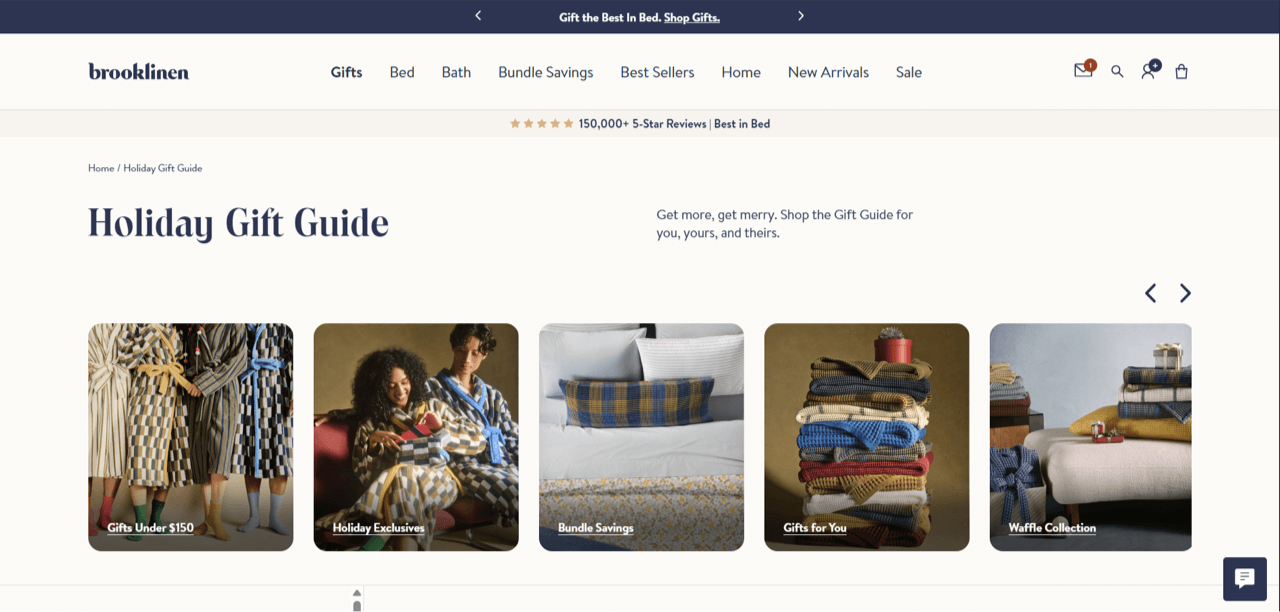
Link your email and popup directly to the advertised collection. If a bestseller sells out, replace it or remove it from the promotion; a gift guide full of unavailable products creates extra work for shoppers. For the email presentation, use our gift guide email examples rather than squeezing every collection into one long message.
A candle, matches, and a reusable tray make sense as a host gift because the items work together. Three unrelated slow sellers do not become a useful bundle just because they share a ribbon. Give the set a recognizable purpose, photograph the complete package, and state exactly what the buyer receives.
Show any saving against the actual separate-item prices. There is no universal bundle discount that protects every store’s margins: packaging, picking, and shipping all affect the result. A gift-ready presentation can be valuable even without a lower combined price.
Create the bundle as a purchasable product or configure your store’s bundling rules before promoting it. An email product card or popup can link to that offer, but it does not assemble the bundle behind the scenes. Measure completed orders and contribution per order alongside average order value.
The Ayoh design takes a different approach to bundles: the shopper chooses the combination. Its bold orange introduction leads into individual sauces with customer quotes and an “Add to bundle” action for each. The layout makes the selection process part of the appeal.
For Christmas, adapt it into a choose-your-own hamper, a four-flavor tasting set, or a small self-care collection. Lead with the finished gift and number of items to choose, then give each option a short reason to belong. Connect the email to your store’s bundle builder so shoppers can assemble the set there.
Engraving, monograms, gift notes, and wrapping answer different needs. Show an example of the finished result and explain which options are available for each product. Include the extra cost and production time close to the choice, rather than revealing them at checkout.
For an initialed gift tag or printed sleeve, use a monogram maker to arrange the recipient’s initials and export the lettering. Show a finished sample beside the gift in your campaign. If you also offer engraving or embroidery, use photographs of the actual production result rather than treating a digital lettering design as proof of how it will reproduce.

Personalized products often need an earlier cutoff than stocked items. Create a separate message for those pages and stop promoting Christmas delivery when that window closes. You can then switch the invitation to a gift card or an item that is ready to ship.
For a printed gift note, a calligraphy text generator can help prepare a decorative heading or greeting. Keep order details and delivery information in ordinary readable text; the decorative treatment should not make the practical information harder to use.

A guaranteed gift can be easier to explain than a prize draw: spend a qualifying amount and receive a specified extra while stock lasts. Choose something that complements the purchase, such as a travel size with a skincare set, rather than a leftover product that undermines the offer.
Set the qualification rules in your store, decide whether the gift is added automatically, and say how customers receive it. If they need to add the item and apply a code, put those steps in the message. Exclude already-qualified shoppers from repeated acquisition prompts where your targeting setup allows it.
A giveaway is a different campaign: entrants receive a chance to win, not a guaranteed gift. If you choose that route, provide clear entry information and avoid treating entries as permission for unrelated marketing. Use the form to collect entries, and arrange the draw and winner notification separately.
An earlier shopping window, a small extra with an order, or a relevant product recommendation can feel more useful than another generic “VIP” code. Decide who qualifies before writing the invitation: previous purchasers, loyalty members, and subscribers are different groups.
Send the offer to that audience and make the destination work as promised. If it is private access, verify the store’s access rules; an unlisted URL or a VIP heading alone does not restrict a sale. After a purchase, change the next message to product care, a complementary item, or a thank-you rather than continuing the same acquisition offer.
On the website, a coupon can look like an invitation rather than another rectangular sale banner. This design uses a black ticket shape, a perforation-style divider, and an oversized discount. It keeps the offer compact while giving the coupon action its own space. Adapt the sample 30% to your actual benefit and add the eligibility or deadline in the supporting line.
Use the same offer in the customer email and configure the code and button action for your store. The holiday newsletter guide includes a coupon email template for that follow-up.
A “12 Days of Christmas” campaign only works operationally if you have twelve worthwhile reasons to return. Plan the products, stock, landing pages, and expiry rules first. If that is too much for your team, run a three-day gifting event with a stronger offer each day instead.
Vary the benefit rather than repeatedly announcing the same discount. One day might feature a gift-ready set, another a wrapping upgrade, and another a subscriber-only product release. Publish the schedule or make it clear when the next reveal arrives so shoppers understand the format.
Use scheduled website campaigns and planned broadcasts to coordinate each change. Check what visitors see after an offer expires, including those who open yesterday’s email. A link to a stable event page can explain today’s offer and clearly mark earlier deals as closed.
A countdown is useful when the closing time changes what the shopper can do: redeem a discount, order a personalized item, or buy before a dispatch cutoff. Give each timer a label that explains the deadline, and keep the date, time, and time zone visible in text too.
This last-day coupon popup combines a code with a countdown. Its sample 24-hour timer needs to be configured for your actual campaign. For a shared Christmas sale cutoff, choose one fixed deadline rather than giving each visitor a different window.
The timer communicates the limit; your store’s discount rule enforces it. Check both, and decide whether the popup should close or show a different message afterward. Our Shopify countdown guide explains on-site campaign uses.
A Christmas collection reveal can also use a short branded countdown animation before the product presentation. Create that visual with TweenFrame’s countdown GIF generator, using the collection’s colors and a clear “Gift reveal” label. This is a fixed animation, not the shipping deadline; keep delivery information in ordinary text and use a live timer when showing time remaining to order.
For an email reminder, use the countdown object in the email editor and keep the actual deadline in readable text. Set it to the applicable cutoff and check the expired state before scheduling the campaign.
Choose a review that resolves uncertainty: whether the packaging is gift-ready, how an item fits, or whether a recipient found it easy to use. A specific observation helps someone choose more than a wall of five-star ratings with no context.
With permission, pair a customer photograph with the relevant product and a short quotation. Keep the meaning intact and make clear which item the review concerns. Avoid implying that a comment about an earlier purchase guarantees this season’s shipping performance.
An existing wrapping demonstration can become a short email visual: convert the useful video excerpt to a GIF, showing the package opening or the finished bow. Link the image to the gift selection and keep the wrapping price or eligibility in the surrounding copy.
For several product views, use a slideshow rather than stacking a dozen nearly identical images. You can prepare an animation with a GIF slideshow maker, but keep the product name and shopping link outside the animation so the email still works when movement is disabled.
Work backward from the arrival date using your own production and dispatch times, destinations, and delivery services. There is no universal “last day for Christmas shipping.” A personalized necklace, a stocked notebook, and an international order may all need different deadlines.
Create a clear notice on the relevant product or cart pages, then send the matching information to subscribers in the applicable regions. This holiday alert template can introduce that notice, but replace its generic delay message with your actual dates, affected services, and a link to full delivery details.
If you promote free shipping, state the minimum spend and exclusions beside the offer. After standard delivery closes, remove the old promise everywhere it appears. A smaller, accurate message is better than a prominent guarantee the store cannot fulfill.
Once the main shipping window closes, filter the offer by what is still possible: eligible express delivery, local pickup, or products already available at a nearby location. Don’t send shoppers to a general gift collection containing made-to-order items with longer lead times.
Explain the conditions at the point of the offer. Local pickup needs a location and collection window; express delivery needs the applicable destination and order cutoff. Where arrival is an estimate, describe it as an estimate rather than converting it into a guarantee in the email subject line.
Pause or replace the campaign as soon as its deadline passes. That includes scheduled newsletters: a morning send delivered gradually across the day could reach some people after the ordering window has closed.
A gift card is useful when the recipient wants to choose the size, color, or product themselves. Lead with that freedom and explain the denominations, delivery method, and redemption process. Only promise instant delivery if your store actually provides it under the stated conditions.
Link directly to the gift-card product and show a preview of what the recipient receives. If buyers can choose a delivery date or add a message, explain those options before checkout. After physical-gift deadlines pass, switch your main holiday promotion to this destination instead of leaving expired shipping promises in place.
Our holiday newsletter copy templates include a last-minute gift-card email you can adapt to your delivery setup.
After Christmas, shoppers may be spending a gift card, replacing something that did not fit, or buying for themselves. Build a campaign for those situations instead of reusing a “gifts delivered by Christmas” email with a new subject line.
Choose a defined range of discounted inventory and explain the offer plainly. This template puts the coupon, campaign banner, and countdown at the center of the email, with no Shopify product feed to connect. Use your own sale image and link the main action directly to the discounted collection.
Replace the sample code with your active offer, set the end time, and describe the eligible range. If the prices are already reduced and no code is needed, remove the coupon block and explain that the discount is included in the displayed price.
Choose the milestones that apply to your products rather than filling every December date with a promotion. A small store can build a coherent season around a collection launch, one gift-selection campaign, and accurate delivery reminders. Black Friday and Cyber Monday can have their own offers without dictating the rest of December.
| Stage | Website campaign | Email follow-up |
|---|---|---|
| Before the collection launches | Collect early-access interest and gift preferences | Confirm the promise and announce the opening |
| While all delivery options are open | Gift collections, bundles, and relevant offers | Curated picks for different interests or budgets |
| Before each fulfillment cutoff | Destination-specific delivery information | A reminder to the audience that can still use it |
| After physical-gift cutoffs | Eligible pickup options or digital gift cards | A clear alternative with accurate delivery details |
| After Christmas | Gift-card shopping and selected sale items | Thank-you, product care, or a relevant new offer |
Use one defined collection as the destination for a Christmas popup and the source for dynamic product cards in your email. A “ready to ship” collection should contain gifts that meet the stated cutoff; move made-to-order products into their own earlier campaign. This gives shoppers the same selection from the first invitation through to the store.
Use product and cart targeting for offers that depend on what someone is buying, such as a matching accessory or an eligible gift-wrapping option. Configure the actual offer in Shopify, then explain it in the widget. The holiday newsletter guide covers the corresponding email setup.
Before you publish, follow the whole journey on a phone: open the popup, submit the form, read the follow-up, click the product, and check the discount or shipping rule in the store. Test the expired state too. A polished announcement is not enough if the link opens the wrong collection or the code excludes the advertised item.
Measure the action each campaign is meant to produce. A preference form should collect usable answers; a shipping notice should help visitors reach the right delivery information; a sales offer should be evaluated against orders and margin. Compare audience and product choices, not just headline click rates.
Keep the email work coordinated with the website work. Use Black Friday marketing ideas for that specific event and the holiday newsletter guide for the Christmas and year-end messages that follow it.
Start with a small gift collection, one gift-ready bundle, and clear delivery information. Add a signup for a useful guide or early access if you can deliver the promised follow-up. Choose offers your inventory and margins can support rather than copying a large retailer’s discount.
Plan before your customers need to order. Personalized or made-to-order products require an earlier campaign than stocked goods. Work backward from production and shipping deadlines, then schedule your launch and gift-selection messages around those constraints.
Organize gifts by budget or recipient, create ready-to-give bundles, offer wrapping or personalization, and give subscribers early access to a collection. Make the added value specific rather than implying savings that do not exist.
Only if you can prepare worthwhile offers, stock, and campaign changes for each day. A shorter event may be more manageable. Keep expiry rules and destinations accurate for people who open an earlier email after its offer ends.
Promote eligible local pickup or express delivery only while those options remain available. Digital gift cards can be a useful alternative; explain how and when the recipient receives them. Remove expired physical-delivery promises.
Daniel Brooks writes about ecommerce, marketing, and customer experience. His work covers how businesses reach customers, sell online, and keep people coming back. For the Getsitecontrol blog, he turns these topics into practical guides, with examples that readers can adapt to their own stores.
You’re reading Getsitecontrol blog where marketing experts share proven tactics to grow your online business. This article is a part of Ecommerce marketing section.
Create popups for free
Email forms, promos, coupons, surveys, bounce-stoppers.
Get started, it’s free →Subscribe to get updates
Get beginner-friendly tips for growing your online business.