
Create your Black Friday email with Getsitecontrol
Choose a template and make it your own. Start with 1,000 free email sends, plus another 1,000 when you import contacts.

A Black Friday email promotes a store's seasonal offer and gives subscribers a direct way to shop it. A strong campaign makes the discount, eligible products, and deadline easy to understand. The right template then helps you present the message: a sale announcement puts the offer first, a product email helps shoppers choose, and a checkout reminder brings them back to the items they selected.
This guide brings together six editable Black Friday email templates, a campaign example from reMarkable, subject line ideas, and a sample email sequence. You'll see when each layout works and how to adapt it for your own sale.
The templates are built in Getsitecontrol, an email marketing platform for designing campaigns, managing subscribers, and creating automations. Its visual editor lets you customize emails without coding. Shopify merchants can connect the Getsitecontrol Shopify app to add store products, personalized recommendations, and checkout recovery to their campaigns.
You can try your first campaign on Getsitecontrol's Free plan, with no monthly subscription fee. It includes 1,000 email sends to start and another 1,000 when you import contacts. After those initial credits, you can buy additional sends as you need them.
Table of contents
Start with the offer and its destination, then choose the layout. A sitewide discount can work with one campaign image and a button. For a sale covering selected products, a product grid helps readers see what's included and choose where to begin.
| Email purpose | Template features | Main message |
|---|---|---|
| Announce the sale | Campaign photography and coupon | The offer, opening time, and where to shop |
| Recommend popular products | Bestsellers, coupon, and slideshow | A selection of customer favorites |
| Show the sale selection | Product grids by category and coupon | The products and savings available |
| Introduce fresh inventory | New items, slider, and coupon | New arrivals included in the promotion |
| Send a final reminder | Countdown, discount banner, and product grid | The offer and its closing time |
| Recover a checkout | Abandoned items and related products | The shopper's selected items and a way back |
All six layouts can be customized with your branding and copy. Shopify product feeds and abandoned-checkout content require a connected Shopify store. For other websites, build your product sections with your own images and links.
The templates below cover the main messages around a Black Friday sale, from opening announcements to closing reminders. Each section explains the purpose of the email and the design choices that support it, followed by a template you can customize. The checkout-recovery template serves a separate role in an automation triggered by a shopper's unfinished checkout.
A sale announcement tells subscribers that the promotion is open and gives them a reason to visit. This template pairs campaign photography with a Black Friday headline, a sitewide discount, and a coupon code. The offer is easy to grasp before readers reach the product selection.
Give the discount and product range the most prominent position. For example, “25% off winter layers” communicates both the saving and the selection. A button such as “Shop the Black Friday sale” can lead directly to the eligible collection. Litmus's guide to email calls to action explains how a clear primary action and its destination work together to move readers toward the campaign's goal.
Keep the headline, code, and shopping button together so readers can act without searching through the email. You can also adapt this layout for early access by addressing eligible subscribers and giving them their shopping link and access time.
Customize the announcement template below with your own product photography, brand colors, coupon code, and sale link.
For a custom headline graphic, TweenFrame offers free online tools for creating and editing animations, images, and videos. Its animated text generator lets you style a short sale message and export it as a GIF. This version introduces “BLACK”, “FRIDAY”, and “SALE” one word at a time, in blue lettering with a yellow shadow on pink. Keep the discount and conditions in the email text beside it.
A bestseller email helps subscribers decide what to explore within a large sale. Familiar favorites can provide a starting point for first-time buyers, while returning customers may discover a popular item they haven't tried.
This template combines a slideshow, product cards, and a coupon. The campaign image sets the mood, while the cards provide names, prices, and direct links to products. For Shopify stores, the Bestsellers feed selects products by sales volume and fills in their details, saving you from assembling each card manually.
Choose a focused selection with enough space for readers to compare the products on a phone. The main collection button gives them a broader browsing option, while individual cards let them go straight to an item. A brief explanation of why you chose the range can make the email more persuasive than a grid of products alone.
Give your bestseller selection a theme, such as customer favorites for gifting or everyday essentials. The theme helps shoppers understand why these products belong together and gives your email a stronger story.
A sale-selection email puts relevant products in front of the reader. It works well when a promotion covers a broad range and shoppers need help finding their category. Product names and images give them a reason to click a particular item; category buttons offer a route to the wider selection.
This sale-selection template introduces a Black Friday early-access offer, explains the coupon, then groups products into men's, women's, and kids' sale styles. Each section has its own shopping button. This structure lets readers find a relevant starting point without working through one long, mixed product grid.
Replace the sample products and offer terms with your own. For Shopify stores, Getsitecontrol's On sale feed selects products with a compare-at price and can display their pricing. For a coupon-based promotion, feature the eligible collection and explain how the code changes the price. You can keep the category structure or focus the email on one audience's interests.
A new-arrivals email gives subscribers a fresh reason to return during the promotion. It is especially useful when the opening announcement featured established products and you have a new collection, color, or seasonal range included in the sale.
This template pairs a new-product feed with an animated banner and coupon. For Shopify stores, the Newest feed selects products recently added to the store. Explain what makes those products worth exploring, whether that's a new material, a different fit, or pieces that complement an existing range.
Lead with the new collection and use the discount as a supporting reason to shop. Our new arrival email examples offer more ideas for presenting a launch through photography, product grids, and animation.
A last-chance email reminds interested subscribers that the sale is closing and gives them a convenient route back. A concise offer, a specific end time, and one prominent button usually provide the structure this message needs.
The reMarkable email below shows how that can work for a single product. Its closing-sale headline, paper tablet image, and offer all support the same buying decision. The limited number of competing elements keeps attention on the product and deadline.
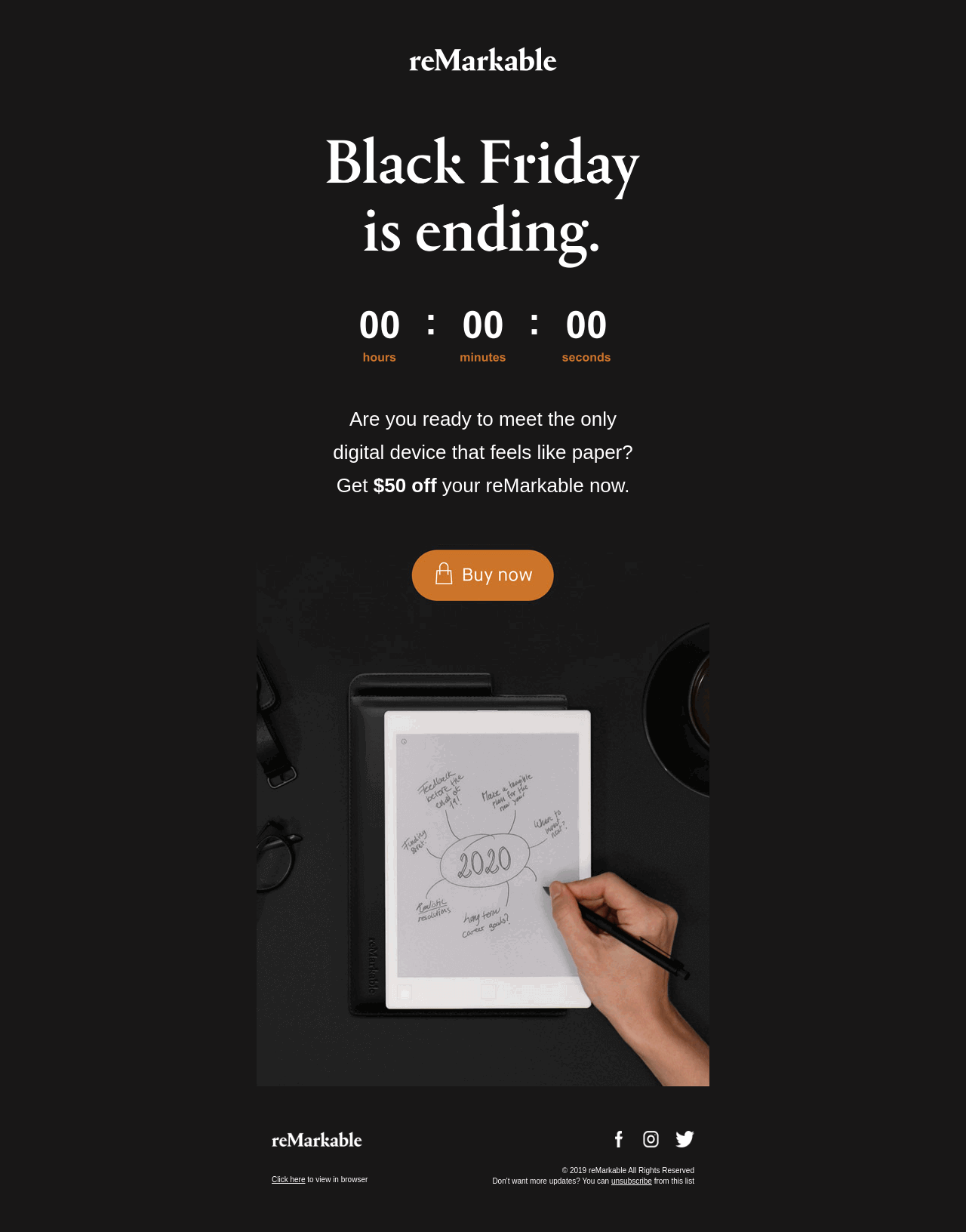
The final-reminder template below combines a Black Friday closing message, a countdown, and a clear discount. Customize it in Getsitecontrol with your own offer and products, then set the countdown to the date and time your sale ends. Include that deadline in the text as well, and link the shopping buttons to the eligible collections.
For a decorative countdown animation in your campaign's typography, TweenFrame's free countdown timer GIF generator lets you customize digits, labels, and colors. Its exported GIFs work with any email editor that supports GIF images. The countdown duration guide explains the available animation lengths. Use an exported GIF for a fixed animation sequence and the email editor's live countdown for your actual sale deadline.
Our last-chance email templates include more approaches for closing offers, coupons, and shipping deadlines.
A checkout-recovery email helps a shopper resume a purchase they started. It runs in response to an unfinished checkout, separately from your scheduled Black Friday announcements. The selected products and a direct return link give the email its relevance.
In Getsitecontrol, this template works with the Shopify Checkout abandonment trigger. The Abandoned items element displays products from the checkout, and a button with the Continue checkout action brings the shopper back to it. You can follow the reminder with practical help about delivery, sizing, or returns, depending on what customers commonly ask before ordering.
The template also includes related products and a slideshow. Keep the abandoned items first, then use recommendations to offer alternatives when they help the shopper decide. Our abandoned checkout email guide explains the trigger, delays, and recovery content in more detail.
A Black Friday email sequence connects the messages around your sale, so subscribers hear about the opening, see relevant products, and have time to act before it closes. A launch email and a final reminder make a practical starting pair. Early access, a teaser, or a curated selection can add value when they give the audience another reason to shop.
The example below assumes a sale that opens on Friday and continues through Cyber Monday. Adapt the timing to your own promotion and usual sending frequency. The optional messages give you ways to expand the campaign without sending every email to every subscriber.
| Timing and purpose | Audience | Message and starting template |
|---|---|---|
| 3 to 7 days before opening: optional teaser | Subscribers interested in the upcoming sale | Introduce the date or invite early-access signups. Adapt the announcement layout. |
| The day before opening: optional early access | Subscribers who qualify for early shopping | Share the access time, offer, and shopping link. Adapt the early-access layout. |
| Friday, when the sale opens: launch | Your selected sale audience | Announce the offer and eligible range. Use the announcement or sale-products template. |
| During the weekend: optional product selection | Subscribers interested in the featured category | Give shoppers a focused selection. Use bestsellers or new arrivals. |
| Several hours before Monday's closing time: final reminder | Relevant subscribers who have not yet purchased in the sale | Restate the offer and exact deadline. Use the countdown template. |
If your sale ends on Friday, bring the final reminder forward to that day. For a promotion that continues through Monday, communicate Monday's deadline from the start. A separate Cyber Monday offer deserves a message explaining what has changed.
Checkout recovery runs alongside this calendar whenever a shopper leaves an eligible checkout unfinished. Review how it fits with welcome emails and other active automations, especially when several messages contain discounts. Your broader Black Friday marketing plan can coordinate the email offers with the promotion on your website.
An effective Black Friday subject line tells subscribers what they can gain from opening the email. Put the strongest information early, whether that is the discount, a product category, or an access time. Nielsen Norman Group's subject-line research supports descriptive wording that helps readers understand the message while scanning their inbox.
Getsitecontrol's free AI subject line generator can help you explore wording for your own offer. Describe the sale and the products you want to feature, then use the suggestions as starting points for your campaign. The examples below show several directions you can adapt with your discount and dates.
Preview text is the short supporting message shown beside or below the subject in an inbox. Use it to add a detail that helps someone decide to open, such as the product range, the benefit of early access, or the exact closing time.
| Subject line | Preview text | Why the pair works |
|---|---|---|
| Your early access starts now | Shop the Black Friday collection before it opens to everyone tomorrow. | The subject announces access; the preview explains the advantage. |
| Black Friday: 25% off winter layers | Knitwear, jackets, and everyday favorites. Your code is inside. | The subject gives the offer; the preview identifies the range. |
| Last day for Black Friday savings | The sale closes tonight at 11:59 PM ET. | The subject signals the final day; the preview supplies the exact deadline. |
Once you have chosen a template and planned the messages, Getsitecontrol brings the design, audience, and sending schedule into one platform. The main decisions are what each email offers, who should receive it, and whether it belongs in a scheduled broadcast or an event-triggered automation.
The visual email editor lets you customize your template's typography, colors, images, and content. For a focused announcement, a headline, short explanation, and shopping button can carry the message. A larger sale may benefit from product cards that give readers several ways into the collection.
Shopify product feeds fill those cards with products and their details. Bestsellers, discounted products, new arrivals, and specific collections each give the email a different focus. Purchase-based recommendations can tailor a selection to individual customers. Choose the feed that supports the message you planned, then use the surrounding copy to explain why that selection matters.
Coupons and countdowns make the offer easier to act on. A shared code suits a public promotion, while Shopify's unique single-use codes can give each recipient an individual discount code. A fixed countdown fits a sale with one closing time. Slideshows and animated text add movement to product presentations and campaign headlines.
The same Black Friday offer can support different messages. Early-access subscribers need their shopping link, a customer interested in one category may appreciate a focused selection, and someone who has already bought may be ready for a complementary product. Shopify's Black Friday email strategy guide also highlights loyal customers and category preferences as ways to segment holiday campaigns.
In Getsitecontrol, you can select audiences using tags, contact fields, email engagement, and Shopify purchase data. An early-access signup tag can identify people who requested the invitation. A saved product preference can help you choose recipients for a category email. Recent purchases can inform whether someone receives another sale reminder or a different recommendation.
You can collect those preferences before the sale with a signup form. The template below includes checkboxes for women's clothing, men's clothing, and accessories. Adapt the choices to your categories and the headline to your Black Friday invitation, then save responses in contact fields or tags for later audience selection.
Broadcasts let you schedule your launch, product selections, and final reminder for their chosen audiences. Preparing them together makes it easier to keep the offer and design consistent across the weekend. You can reuse a layout while changing the headline, featured products, and reason to visit.
Automations handle messages that depend on an event, such as a form submission or an unfinished Shopify checkout. For recovery, choose the Checkout abandonment trigger, then add the email, delays, and any filters that shape the sequence. This keeps each recovery message connected to the shopper's checkout and lets the sale broadcasts follow their own schedule.
Testing helps you decide which message or design to send. Campaign reporting then shows how subscribers responded. Use both to improve the decisions within your control, such as which products to feature or how to describe the offer.
Getsitecontrol's broadcast A/B testing lets you send variants to part of your audience before delivering the winning version to the rest. It is available on paid plans. For Black Friday, you could compare an offer-focused subject with a product-focused subject, or test a single campaign image against a product grid.
Keep the comparison focused. If only the subject changes, keep the body the same. If you're comparing product layouts, use the same subject and offer. Getsitecontrol evaluates tests of inbox elements using opens and tests of body content using clicks. Leave enough time for the evaluation and the remaining audience to receive the email before the offer closes.
Broadcast reporting shows delivery, opens, clicks, and individual link performance. Product-link clicks can help you see which items drew attention, while comparing the main button with individual cards can show how readers prefer to browse. Unsubscribes and complaints provide additional context when reviewing the frequency and relevance of your messages.
Getsitecontrol's Apply UTM tags option adds campaign parameters to broadcast links, so you can identify the traffic in your website analytics. Where ecommerce purchase tracking is configured, review that traffic alongside orders. Strong clicks with few purchases give you a reason to examine the landing page, offer, or checkout experience. Clicks show interest; completed orders tell you more about the campaign's commercial result.
Before scheduling the campaign, send a test email and review it on a phone and a larger screen. Getsitecontrol's previews help you inspect the layout, and its link checker can flag missing or broken URLs. The checklist below brings the offer and audience checks together with the design review.
| Campaign element | Ready to send when… |
|---|---|
| Offer and coupon | The discount works on the featured products, and any exclusions, minimum spend, or stacking rules are clear. |
| Product selection | Feed products, prices, and images match the promotion. Bestsellers and new arrivals have been checked for discount eligibility. |
| Deadline | The written end time, time zone, countdown, and actual coupon expiry agree. |
| Layout and links | The email reads clearly on a phone, buttons open the intended destinations, and essential offer details remain readable outside animations. |
| Audience and automations | Recipients match the purpose of the email, recent purchases are accounted for, and recovery messages fit with other active sequences. |
| Recovery content | An eligible checkout test displays the selected items and a working return link, with offer terms that will still apply when the email arrives. |
| Sender and schedule | Sender details, reply address, unsubscribe link, and send time are correct, with time allowed for any A/B test. |
Choose the template that fits your first message, then build the rest of the campaign around the sale's opening, product selection, and closing time. A clear offer and a relevant audience give each email a purpose, while consistent design helps subscribers recognize the campaign as it develops.
Getsitecontrol brings the templates, product feeds, broadcasts, and automations together so you can prepare those messages in one place. Start with your opening announcement and use the initial free sending credits to try your first campaign.
A Black Friday email should state the offer, the eligible products, how to claim the discount, and when it ends. Add a prominent button leading to the sale or featured product. A product-selection email can also include images and prices, while a final reminder should make the closing time and time zone easy to find.
A launch email and a final reminder are a practical starting pair for a short Black Friday sale. Add an early-access invitation or a product selection when it gives that audience a distinct reason to shop. Build the sequence around your promotion length and usual sending frequency, and account for welcome and checkout-recovery emails running at the same time.
Send the launch email when subscribers can shop the offer, and a final reminder several hours before it closes so they have time to act. If you offer early access, send that invitation when access opens for the eligible audience. A teaser in the preceding week can introduce the sale or invite signups. Adapt this starting schedule to your sale dates and customers.
Yes. You can customize the layouts in Getsitecontrol with your own images, text, product links, and offer. The automatic Shopify product feeds and abandoned-checkout content require a connected Shopify store. Checkout-recovery emails also use an automation triggered by the unfinished checkout.
A countdown is most useful when the deadline is central to the message, especially a final sale reminder. Product-selection emails can focus on the products and savings instead. For a shared sale deadline, set a fixed end time in the email editor and include the closing time in text. Match it to the actual offer expiry.
You can reuse a Black Friday email layout for Cyber Monday and adapt the headline, offer, products, code, and links. If one promotion covers the full weekend, give its Monday closing date from the start. If Cyber Monday introduces a new offer, explain the change so subscribers have a clear reason to revisit.
Daniel Brooks writes about ecommerce, marketing, and customer experience. His work covers how businesses reach customers, sell online, and keep people coming back. For the Getsitecontrol blog, he turns these topics into practical guides, with examples that readers can adapt to their own stores.
You’re reading Getsitecontrol blog where marketing experts share proven tactics to grow your online business. This article is a part of Email marketing section.
Try email marketing, free
Grow your list with free popups, send 2,000 emails for free.
Get started →Subscribe to get updates
Get beginner-friendly tips for growing your online business.