Put your email list to work
Keep your list clean, send newsletters, and welcome new subscribers with automated emails in Getsitecontrol.

A customer has entered an email address, and you want to check it before replying or adding it to a mailing list. Sending a test message takes time and still tells you little about the address itself.
Paste the address into Getsitecontrol’s free Email Quality Checker. It returns a sending recommendation, an address category, a shared-inbox result, and a spam-filter result. No account or test email is required.
The check assesses the address and domain to recommend whether to send. Checking whether a particular inbox exists is a separate SMTP check, explained below.
Open the checker and choose Single check. Paste the address into the Email address field, then select Verify.
Copy only the address. If you copied a contact from an email app, remove the person’s name and any surrounding brackets or spaces. If the address has an obvious typo, ask the person to correct it; guessing a replacement could send your message to someone else.
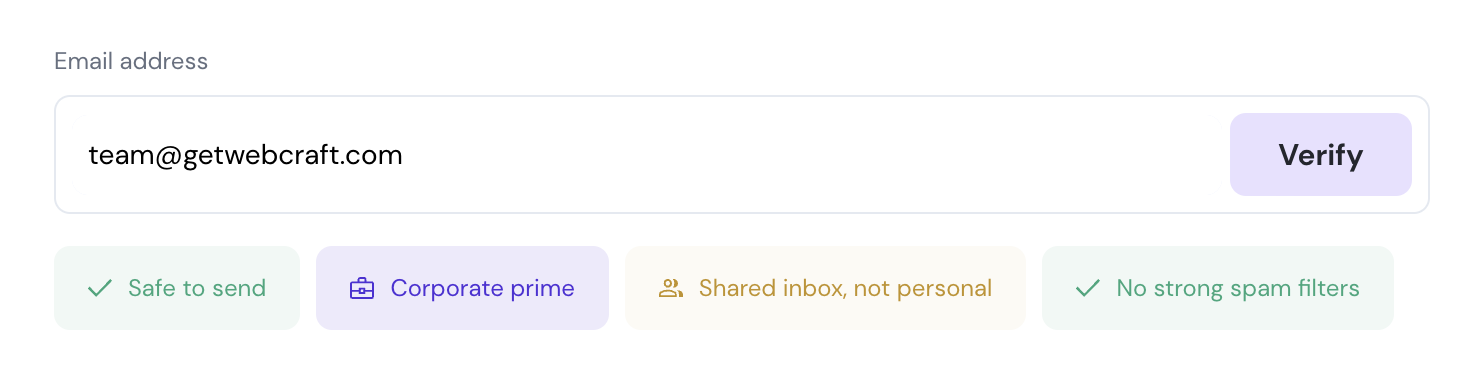
The checker displays four labels below the field. You can open their explanations for more detail.
Check an email address for free →
Start with Safe to send or Do not send. This is the checker’s overall recommendation for the address.
If a subscriber’s result is Safe to send, keep the address in your mailing list. If it is Do not send, exclude it from the campaign. For an important customer enquiry, ask for an updated address through their account or an existing support conversation.
The category identifies the type of address. Corporate and Personal addresses also have prime and basic quality levels. Use the overall sending recommendation to decide whether to include the address; you do not need to choose a cutoff between those levels yourself.
| Category | Meaning |
|---|---|
| Corporate prime / Corporate basic | Business addresses at two quality levels. |
| Personal prime / Personal basic | Personal addresses at two quality levels. |
| Academic / Government | Education or government addresses. |
| Disposable | A temporary email address. |
| Untrusted | An address identified as risky. |
| Broken | A problem with the address or its domain. |
| Unknown | The checker could not assign a known category. |
The shared-inbox result identifies addresses used by a team or department, such as sales@ or support@. It is separate from the quality rating. As the screenshot shows, an address can be both Corporate prime and Shared inbox.
The fourth label shows whether the domain uses strong spam filters. In the example, the result is No strong spam filters.
If filters are detected, keep that information with the contact’s other results. Across a mailing list, you can use it to compare how these contacts respond to your campaigns. It describes the domain’s filtering setup, not the delivery status of an email you have sent.
A visitor enters a disposable address to collect a code. The checker identifies the temporary inbox, so you can leave it out of the welcome series. If this keeps happening, turn on the signup form’s disposable-email filter. The disposable email guide shows how.
A retailer requests trade prices using a team address. If the sending recommendation is good, reply with the requested prices and ordering information. The Shared inbox label explains who may read the reply; it is not a reason to reject the enquiry.
Some customers use long addresses or privacy aliases that forward to their regular inbox. Check the address before removing it. If the result is good, you can continue using the address the customer provided. If it is Broken, ask them to update their details.
Getsitecontrol analyzes address and domain information to produce its recommendation and categories. It does this without sending a test message or running an SMTP conversation with the receiving server.
SMTP verification asks that server about a particular inbox. It is useful when you need the server’s response about accepting mail for that address. The SMTP specification describes how these verification requests work.
| Check | What you learn |
|---|---|
| Address format | Whether the entry has the parts needed for an email address. |
| Getsitecontrol quality check | Whether sending is recommended, the address category, whether the inbox is shared, and whether its domain uses strong spam filters. |
| SMTP verification | How the receiving server responds to a check for a particular inbox. |
| Double opt-in | Whether the subscriber can receive and click your confirmation email. |
Paid verification services often bundle SMTP checks with classification and other tools. Getsitecontrol provides the quality results described above for free, without verification credits.
After checking a new signup, you can ask the subscriber to confirm by email. This is called double opt-in: they enter an address, receive your confirmation message, and click a link to join the list.
For example, someone signs up for your weekly newsletter. Your confirmation email can say “Confirm your subscription to our weekly gardening tips” and include one confirmation button. The subscriber knows who is writing and what will arrive next.
Getsitecontrol includes customizable double opt-in emails on Free. Use your name and branding so the message is easy to recognize.
For a file of addresses, choose Bulk check and upload a CSV with up to 50,000 unique emails. You get a chart and a downloadable result for each address. The email list cleaning guide shows how to use that report to update your mailing list.
Getsitecontrol Pro adds Quality labels to contacts automatically. Use them to choose recipients for broadcasts and automated emails. You can also block disposable and untrusted addresses before they enter your database; the signup filtering guide covers the setup.
Yes. Getsitecontrol’s free checker analyzes the address and domain without sending a test email. Paste the address and choose Verify to see the results.
It checks address quality without SMTP mailbox verification. Use double opt-in when you want a new subscriber to confirm access by clicking a link sent to the inbox.
Keep it if the sending recommendation is good and the contact subscribed or requested a reply. Shared addresses are common for business teams.
No. Numbers, long names, and privacy aliases can all belong to real customers. Check the address before rejecting it.
No. You can upload up to 50,000 unique email addresses per submission and download the results for free, without an account.
Stick is an editorial pen name used by the Getsitecontrol team for guides on email campaigns, fashion marketing, and Shopify store design. These articles focus on practical ways to present products, plan customer communications, and improve the shopping experience.
You’re reading Getsitecontrol blog where marketing experts share proven tactics to grow your online business. This article is a part of Email marketing section.
Try email marketing, free
Grow your list with free popups, send 2,000 emails for free.
Get started →Subscribe to get updates
Get beginner-friendly tips for growing your online business.