Free features: what’s included in the free plan
Getsitecontrol’s free plan includes all the tools you need for creating popups and forms, growing your email list, managing contacts, and sending email campaigns. From widget design and targeting to broadcasts, automations, and contact management, the platform gives you everything you need to build your audience and engage visitors from a single dashboard.
Widget features
Widget templates
You can create popups and forms using ready-made templates or blank layouts. Templates are organized into categories such as announcements, sign-ups, coupons, surveys, contact forms, cookies, and age verification. All templates are available on the free plan.
AI-adapted preview
Before opening a template in the editor, you can preview it in its original form or as an AI-adapted version personalized with your website content, branding, and language.
Widget types
Widgets are available in several display formats depending on how you want them to appear on the page. Each premade template is built using one of these widget types, which determines how the widget is displayed and positioned on the website. The free plan includes all widget types.
| Widget type | Description |
|---|---|
| Modal | Centered popup displayed on top of the page content with a background overlay, commonly used for email signups, promotions, announcements, and special offers |
| Slide-in | Popup that slides into view from the side or corner of the screen, providing a less disruptive way to display messages and forms |
| Sidebar | Full-height side panel that stays attached to the edge of the screen while visitors continue browsing the page |
| Bar | Horizontal bar displayed at the top or bottom of the page for announcements, promotions, cookie notices, and persistent messages |
| Panel | Expandable floating widget that opens when clicked, often used for contact forms, surveys, and persistent calls to action |
| Fullscreen | Full-page overlay that covers the entire screen, suited for onboarding flows, age verification, and high-attention campaigns |
| Inline | Form or widget embedded directly into page content rather than displayed as a popup overlay |
Design
The drag-and-drop editor, available on the free plan, lets you build popups and forms without coding. Widgets can be customized using flexible layout controls and a wide range of content elements, with settings for font, spacing, colors, borders, animations, and other styling options.
Layout and groups
The editor supports complex layouts through nested groups and flexible vertical and horizontal alignment settings. This makes it possible to create side-by-side sections, stacked content blocks, multi-column layouts, and more advanced page structures with consistent spacing and alignment. Separate mobile styling settings allow you to adjust layouts, spacing, and element visibility for different screen sizes and devices.
Objects
Widgets can be built using a variety of content and layout objects, including text, hero images, floating images, icons, countdown timers, buttons, form fields, and groups of objects. These objects can be combined to create announcements, signup forms, surveys, promotions, and other interactive widgets.
Available form field objects include email address, phone number, text inputs, dropdowns, radio buttons, checkboxes, ratings, consent checkboxes, and hidden fields for storing background data such as UTM parameters or API values.
Button actions
Buttons support multiple actions depending on the widget type and use case. In addition to submitting forms and opening links, buttons can copy text to the clipboard, open another widget, and, for Shopify stores, add products to the cart or apply discount codes directly from the popup.
Multi-page widgets
Widgets can include multiple pages for surveys, onboarding flows, step-by-step forms, and thank-you screens. This makes it easy to break longer forms into smaller sections and create more guided user experiences.
Teasers
A Teaser is a small floating element that opens the main widget when clicked. Teasers provide a less intrusive way to display a popup on the screen, making them useful for persistent contact widgets, feedback forms, or promotional offers that remain accessible while visitors browse the site. Teasers have their own design, position, animation, and icon settings.
Dynamic Text Replacement
Dynamic Text Replacement lets you personalize widget content using variables and visitor data. Widgets can display information such as form responses, visitor location, device type, UTM parameters, current date, or Shopify product and customer data.
Variables can be inserted into widget text, form fields, and button URLs, making it possible to create more personalized messages and flows. Custom API parameters can be passed dynamically to widgets for more advanced personalization use cases.
Games and conditional content
Reveal cards, scratch cards, and prize wheels let visitors play for an offer inside a widget. Set the prizes, their codes and winning probabilities, then choose how often visitors can play again. A welcome campaign could offer either a discount or free shipping, with the result shown in the same popup.
Display rules let you show relevant content as visitors answer. Select an object, choose + Add rule, and set the answer that should make it appear. You can control individual fields, images, text, buttons, or a whole group. Combine conditions with AND or OR, and use game results to reveal the appropriate reward message.
For example, a “What are you shopping for?” question can reveal a different product image and button for each choice.
Targeting
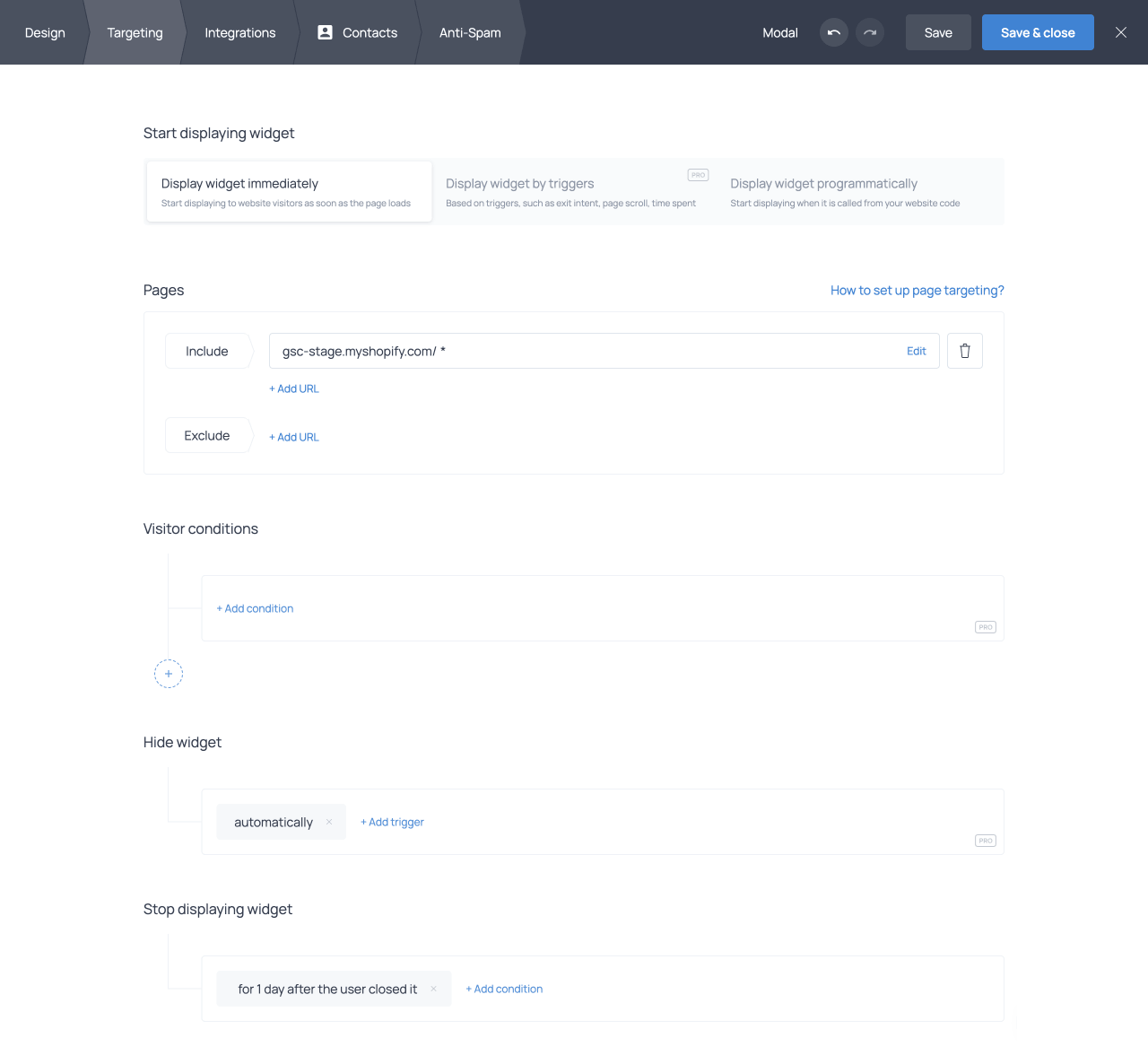
The Targeting tab controls where widgets appear and how often they are displayed. These settings control widget visibility across different pages and reduce unnecessary interruptions for returning visitors.
Page targeting
Widgets can be displayed on specific pages or groups of pages based on their URL. For example, you can show a popup only on selected landing pages, across all blog articles, or everywhere except the checkout pages. For Shopify stores, targeting presets are available for common ecommerce pages such as product pages and cart pages.
You can also target visitors based on URL parameters, such as UTM tags added to campaign links. This makes it possible to display different widgets for visitors coming from specific ads, newsletters, or marketing campaigns.
Stop conditions
Stop conditions control when a widget should stop appearing for a visitor. For example, a popup can stop displaying permanently after someone submits a response, remain hidden for a number of days after being closed, or stop appearing after it has been viewed a certain number of times. These settings create a smoother browsing experience for returning visitors.
Integrations and data storage
Widgets can be connected to third-party applications so that collected data is automatically synced after form submission. The same widget can be connected to multiple integrations at the same time, allowing submissions to be sent to several platforms simultaneously.
Email marketing and CRM integrations
The free plan includes integrations with email marketing and CRM platforms such as Mailchimp, Klaviyo, Brevo, Mailerlite, and many more. When someone submits a form, the data is automatically sent to selected lists or audiences in the connected platform.
Field mapping lets you match form fields with the corresponding fields in each connected service. In addition to form responses, you can sync system data such as visitor location, device information, UTM parameters, and submission date; you can also send static values to identify how and where the contact was collected.
Other third-party integrations
Getsitecontrol also includes integrations with other types of third-party tools, including Google Analytics 4, Google Sheets, and Zapier.
The Google Analytics 4 integration automatically tracks widget events such as views, submissions, clicks, and other interactions alongside your existing website analytics.
The Google Sheets integration can automatically send form submissions to a spreadsheet, while Zapier can be used to connect widgets with additional third-party applications and automation tools.
Webhooks
The free plan includes webhooks for sending form submissions to external systems in real time. Submitted data is automatically sent to a specified URL, making it possible to process submissions outside Getsitecontrol. Webhooks can be used to store submissions in a custom database, trigger internal workflows, or send data to unsupported third-party tools and applications.
Contact mapping and tags
The Contacts tab of the widget editor controls how form submissions are stored in the Getsitecontrol database. You can map form fields to contact fields, create custom fields, and automatically assign tags to contacts when forms are submitted.
Double opt-in emails
The free plan includes customizable Double opt-in emails for verifying subscribers before they are added to your contact list. After someone submits their email address in a form, they receive a confirmation email containing a verification link. Only confirmed subscribers are added to the database, reducing fake signups, typos, and spam submissions.
Double opt-in emails can be customized with your own subject line, sender name, message content, and sender domain. Multiple widgets can use the same confirmation email, and separate versions can be created for different languages or campaigns.
Widget statistics
Built-in analytics provide detailed performance data for every widget, including views, actions, click-through rates (CTR), and engagement trends over time. Each widget card in the dashboard displays a quick statistics summary with total views, total actions, and combined CTR across all configured actions. Opening the statistics panel reveals more detailed metrics, including separate CTR and action counts for individual button actions, trend charts, and audience breakdowns.
The full Statistics page provides a deeper analytics view with filters for widget, channel, country, device, and date range. It includes dedicated charts for views and actions over time, as well as detailed audience and technical breakdowns by country, browser, device, screen resolution, traffic source, and traffic medium. Additional tables display widget and page-level performance, helping you identify what widgets perform best and where. Statistics and response data can also be exported in CSV format for external analysis or reporting.
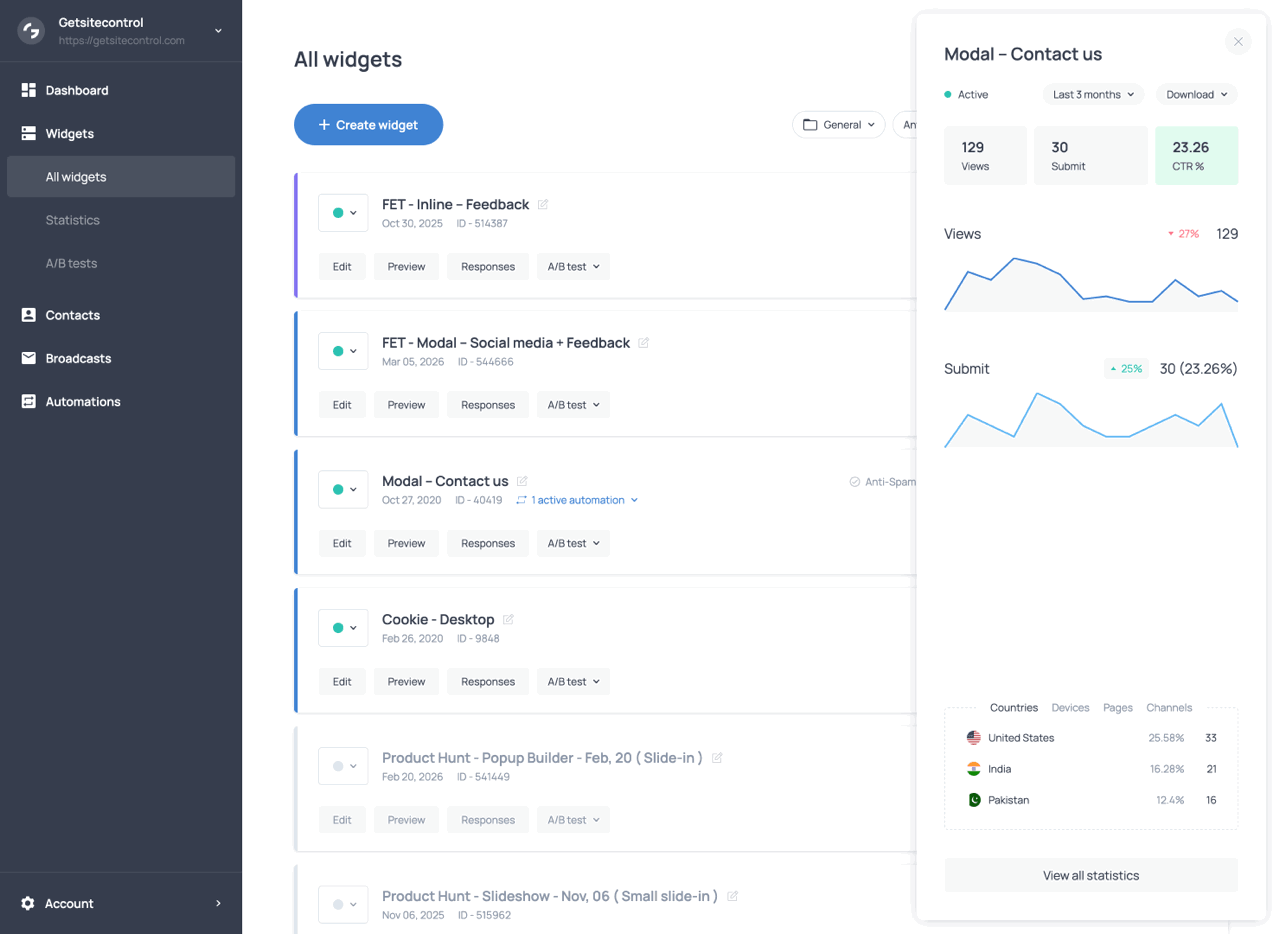
The statistics panel featuring action statistics, trend charts, and audience breakdown
Email marketing features
Email marketing features are available on the free plan, including the email editor, broadcasts, automations, audience segmentation, and reporting tools. The free plan includes 1,000 email sends, plus an additional 1,000 sends when you import contacts from an external source. Once those credits are used, additional sends can be purchased separately by adding more email credits to your account.
Email design
Broadcasts and automation emails use the same drag-and-drop email editor, which is included on the free plan. You can start from customizable templates organized by campaign type, or build emails from scratch using flexible content blocks and layout elements. The editor allows you to create visually rich newsletters, promotional campaigns, onboarding emails, abandoned cart reminders, and post-purchase follow-ups.
Visual and animated elements
The email editor includes a range of visual and animated elements designed to make campaigns more engaging and interactive. Countdown timers can be used to create urgency for limited-time offers and promotions. Product cards display product images, prices, star ratings (Shopify only), and buttons leading to the product page, making products easily accessible to browse and purchase. For Shopify stores, product cards can display dynamic product feeds featuring bestsellers, discounted products, and new arrivals.
Slideshows provide a compact and impactful way to showcase multiple products or announcements within a single section of the email. Animated text banners can be used to highlight promotions, discount codes, or calls to action with moving text effects designed to attract attention.
Layout and styling
The editor uses drag-and-drop content blocks for building email layouts without coding. Blocks can be customized independently using settings for spacing, colors, backgrounds, borders, alignment, and button styling. Emails are automatically optimized for mobile devices, with responsive layouts that adapt to different screen sizes and email clients. A built-in preview tool lets you view emails in desktop and mobile formats, as well as in light and dark mode before sending.
Personalization
Dynamic variables can be used to personalize email subject, preview, and text with contact information and other data collected through forms. For Shopify customers, product cards can display personalized product recommendations based on purchase history; Shopify automation emails can feature abandoned carts, purchased products, and fulfilled orders, depending on the automation trigger.
Inbox elements and testing
Before sending, you can customize the subject line, preview text, sender name, sender domain and email address, and send a test email to an address of your choice to see what the email looks like in a real inbox.
Broadcasts
Broadcasts are one-time email campaigns sent to a selected audience. They are typically used for announcements, promotions, newsletters, product launches, seasonal campaigns, updates, and other marketing communications that are sent manually rather than triggered by subscriber behavior.
Email creation
Broadcast emails are created using the built-in email editor covered in the Email design section above. You can choose a ready-made template and customize it, or create a unique email design from scratch using drag-and-drop content blocks and styling controls.
Audience selection
Broadcasts can be sent either to saved segments or to audiences created during campaign setup using conditions based on tags, contact fields, marketing status, engagement history, Shopify purchase data, and other subscriber attributes. Conditions can be combined using AND and OR connectors, making it possible to create highly targeted audiences for different campaigns.
Premade audience templates are also available for common use cases, allowing you to quickly target groups such as recently engaged subscribers, inactive contacts, or customers with specific purchase behavior.
Sending mode
On the free plan, broadcasts use the Burst sending mode, which delivers emails immediately at the maximum available speed. Burst sending is suited for time-sensitive campaigns such as announcements, flash sales, product launches, and limited-time promotions where emails should reach subscribers quickly. Broadcasts can either be sent immediately or scheduled for a specific date and time in advance.
Resend feature
After sending, broadcasts can be resent to subscribers who did not open the original email, opened it without clicking, or qualified for the campaign but did not receive the email initially. This allows you to improve campaign reach without resending emails to already engaged contacts.
Performance tracking
Broadcast analytics track both email delivery and subscriber engagement for each campaign. Available metrics include sent and delivered emails, opens, clicks, click-through rates, click-to-open rates, unsubscribes, spam complaints, and bounces. Statistics are updated while the broadcast is being sent and remain available afterward for reporting and performance comparison.
The reporting interface also includes contact-level activity data, making it possible to see which subscribers opened the email, clicked links, unsubscribed, or generated bounces and spam complaints. Link-level click statistics help identify which calls to action and sections of the email generated the most engagement.
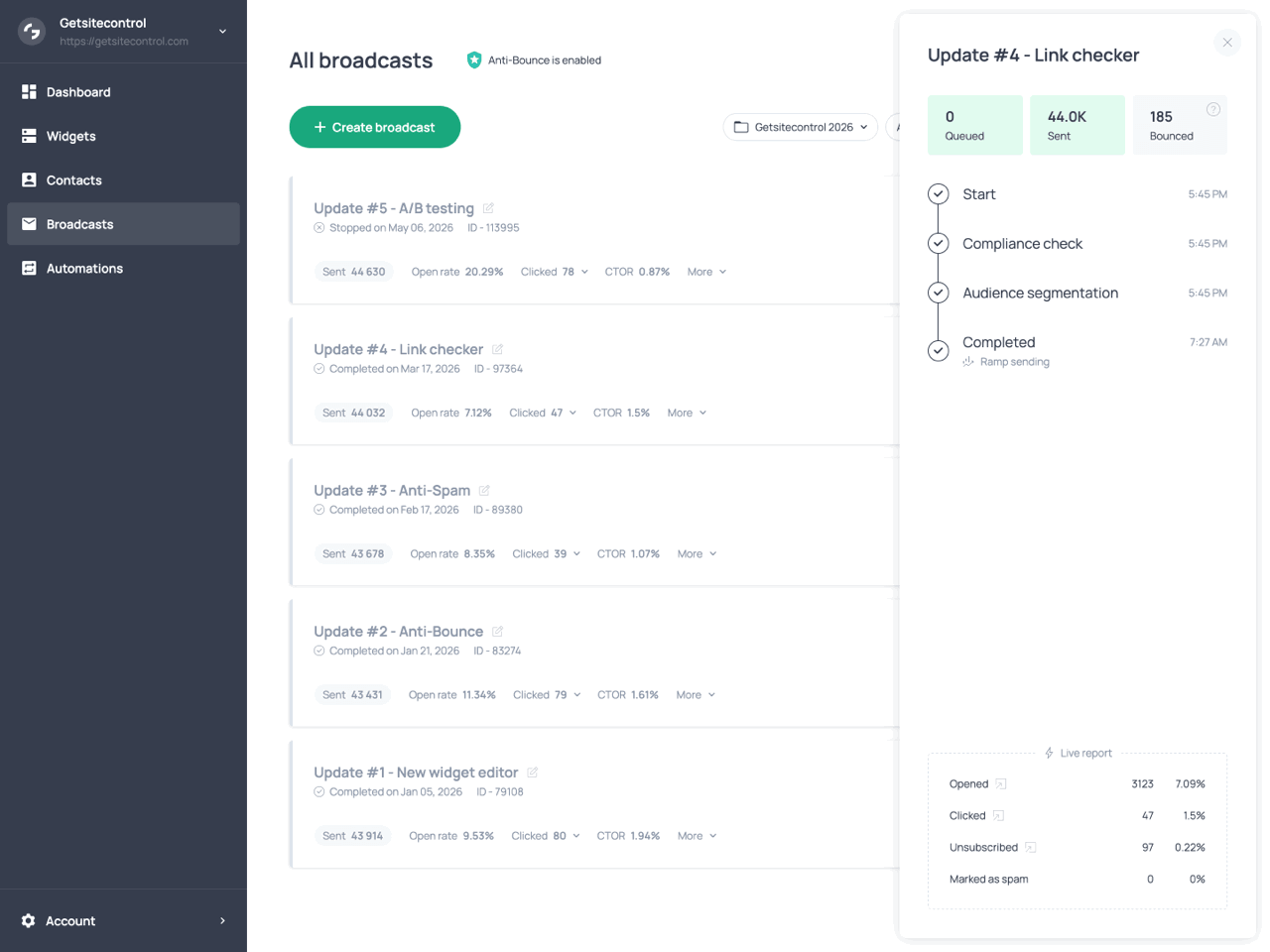
The tracking panel of a delivered broadcast
Automations
Automations let you send emails and perform actions automatically when specific events occur. Instead of launching campaigns manually, you can build sequences that react to subscriber activity and customer behavior.
Triggers
All automation triggers are available on the free plan. Automations can start automatically when contacts submit forms, interact with emails, enter segments, or trigger Shopify events. Automations can also be launched manually, during imports, or through external webhook requests.
| Trigger | Description |
|---|---|
| Form submission | Starts an automation when a contact submits a connected form |
| Email link click | Starts an automation when a contact clicks a selected link in an email |
| Segment | Starts an automation when a contact joins a selected segment after the automation has been activated |
| Workflow | A reusable sequence of actions that can be launched manually for selected contacts, during contact imports, or from another automation |
| Webhook request | Starts an automation when Getsitecontrol receives a valid request from an external system |
| Checkout abandonment (Shopify) | Starts an automation 20 minutes after checkout is started if the order remains incomplete |
| New order (Shopify) | Starts an automation after a customer places an order |
| Fulfilled order (Shopify) | Starts an automation when an order is marked as fulfilled in Shopify |
| New subscriber (Shopify) | Starts an automation when a new subscriber is added to the Shopify customer list |
| Customer winback (Shopify) | Starts an automation when a customer has not purchased for a selected period of time |
Actions and filters
Automations perform actions such as sending emails, assigning or removing tags, launching previously created workflows, and waiting between steps. Multiple actions can be combined into sequences that run automatically after the automation trigger is activated.
Emails within automations are created using the same drag-and-drop editor available for broadcasts and described in the Email design section above. For Shopify stores, automation emails can also include dynamic ecommerce content such as abandoned carts, purchased products, fulfilled orders, and product recommendations.
Filters can be applied both to entire automations and to individual steps within a sequence. Conditions within filters are based on contact fields, tags, segments, email engagement, and Shopify customer data.
These tools can be used to create automated welcome emails, abandoned cart reminders, post-purchase follow-ups, onboarding sequences, review requests, re-engagement campaigns, and much more.
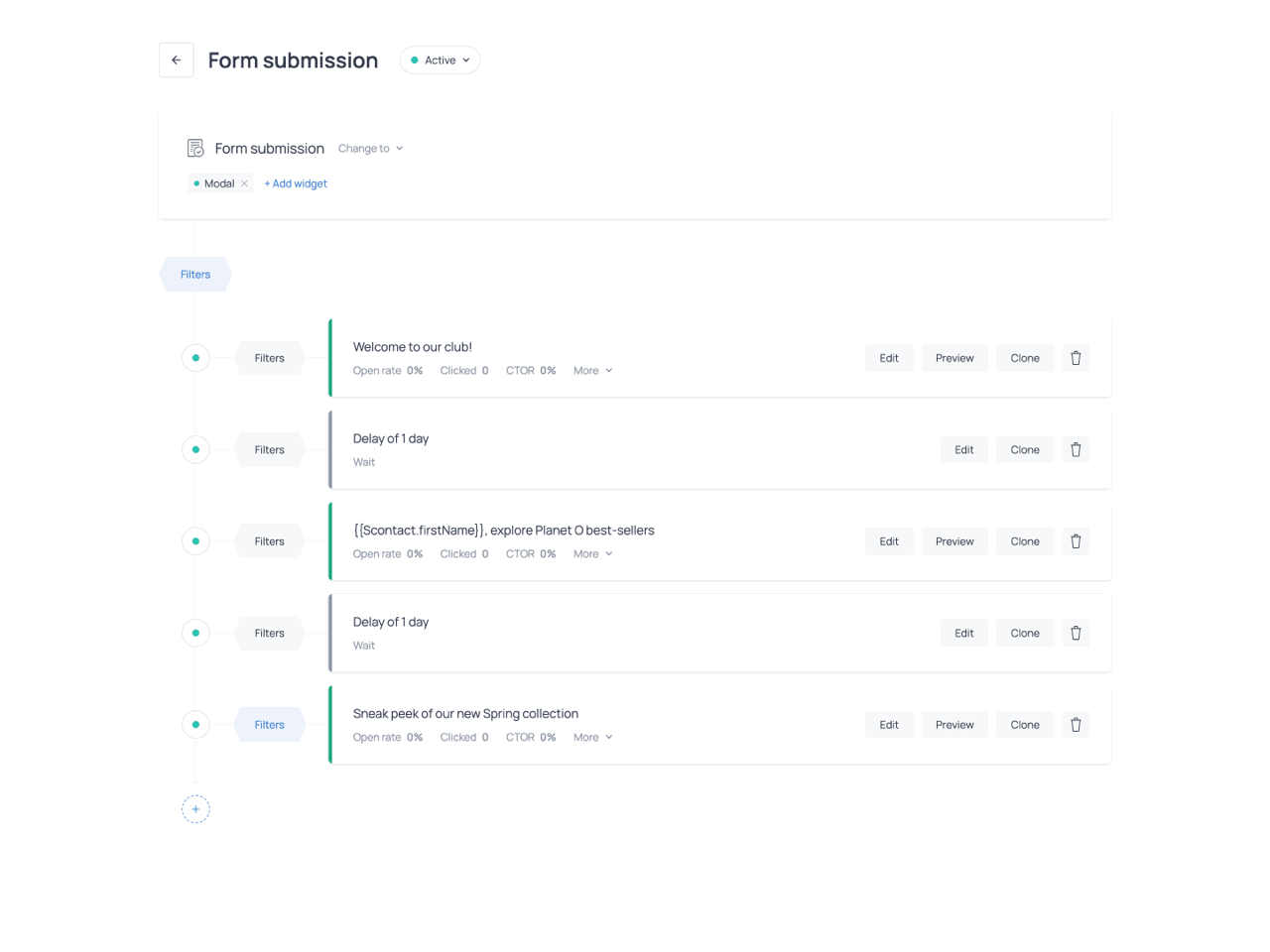
Automation builder showing Trigger, Actions, and Filters
Tracking
Once an automation is activated, you can monitor how contacts move through it using the automation tracking panel. The panel shows which contacts entered the automation and their current status: Ongoing for contacts currently in the sequence, Done for completed automations, Ineligible for contacts filtered out by conditions, and Failed for contacts where a delivery or processing issue occurred.
Clicking on a contact opens their Timeline, a chronological record of their activity including automation entry, emails received, links clicked, completed actions, form submissions, tag changes, broadcast interactions, and other contact events.
Each email in the automation includes performance metrics such as emails sent, open rate, total clicks, click-to-open rate, bounces, unsubscribes, and spam reports. Link-level and contact-level engagement data are also available, making it possible to see which links and calls to action generated interactions and which contacts engaged with the email.
Contact management
The free plan includes a centralized Contacts section for storing and managing all contacts collected through forms or imported either from CSV files or directly from third-party platforms. The section includes tools for organizing contacts, managing audiences, storing contact data, and tracking engagement activity across widgets and email campaigns.
Contact list and filtering
The contact list displays contact details such as email address, marketing status (Subscribed, Unsubscribed, or Bounced), first and last name if collected, signup date, and assigned tags.
Contacts can be filtered using conditions such as country, signup date, marketing status, assigned tags, segment membership, email engagement, campaign activity, and Shopify customer data. Filtering conditions can be combined to create more advanced audience rules. For example, you can create segments for recently engaged subscribers, customers who placed an order, or contacts who submitted a specific form.
The free plan includes direct contact imports from Mailchimp, Klaviyo, and Shopify. Bulk actions are available for exporting selected contacts, assigning or removing tags, launching workflows, and updating subscription status.
Fields, tags, and segments
Getsitecontrol includes default contact fields such as email address, phone number, name, country, marketing status, and date added. You can also create custom fields for storing additional contact information collected through forms, imports, integrations, or automations.
Tags can be assigned manually, automatically through form submissions and automations, or during contact imports. They can be used to organize contacts, trigger automations, and create filtered audiences for email campaigns.
Segments are dynamic groups of contacts built using saved filtering conditions. Unlike static contact lists, segments update automatically as subscriber data and activity change over time.
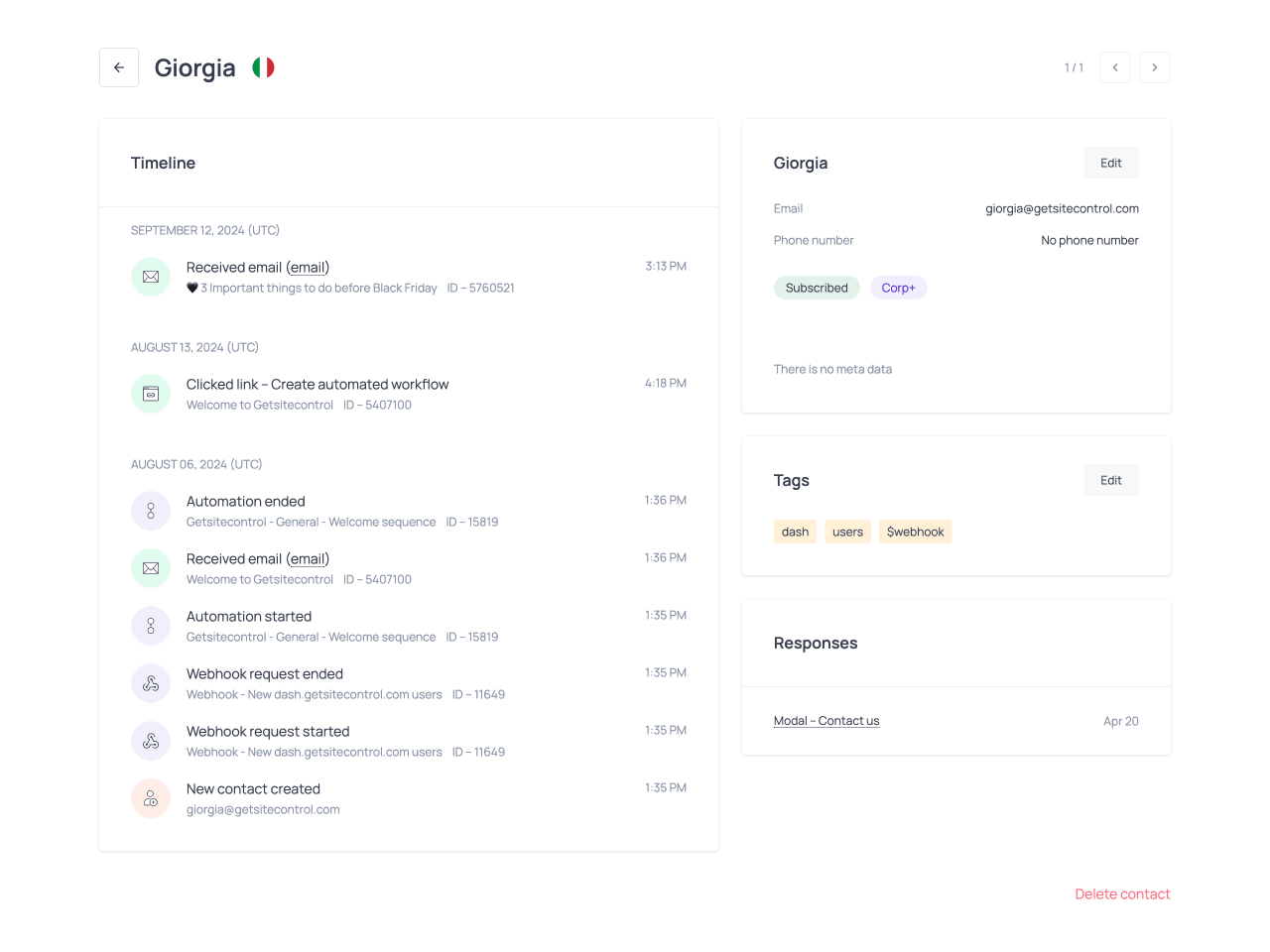
Contact Timeline
Each contact includes a detailed Timeline showing activity across widgets, email campaigns, and automations. Timeline events include form submissions, emails received, opens, clicks, tag changes, automation activity, subscription status updates, and Shopify events.
The Timeline provides a chronological view of each contact’s activity history, making it easier to review engagement, troubleshoot automations, verify campaign behavior, and understand how individual contacts interact with your site and emails.
More features
AI widget builder
Describe the popup or form you want in Ask AI inside the widget editor. The assistant can build and change its pages, content, appearance, teaser, and targeting in the current draft. You can refine the result with follow-up requests, such as “Use our brand colors,” “Add a phone field,” or “Make the mobile version more compact.”
Review the desktop and mobile versions, then save your changes.
AI text assistant
The free plan includes an AI text assistant available across both the widget editor and the email editor. AI tools can be used on text elements such as headlines, paragraphs/descriptions, subject lines, and preview text.
The assistant can improve writing, fix grammar, shorten or expand text, change tone, translate content, and generate alternative copy variations directly inside the editor. This allows you to adapt messaging for different campaigns, audiences, and languages without leaving the editing workflow.
Link checker
Before emails are sent, Getsitecontrol automatically checks links included in broadcasts and automation emails to help identify broken or invalid URLs. The link checker scans buttons, text links, product cards, banners, and other clickable elements, reducing sending errors and improving email reliability and deliverability.
UTM tracking
UTM tracking parameters can be added automatically to links in both broadcasts and automation emails for campaign attribution and tracking in external analytics tools such as Google Analytics. UTM settings are configured separately for broadcasts and automations, making it possible to track different email types independently. Automatic tagging helps track traffic, conversions, and campaign performance without manually adding UTM parameters to individual links.
Custom email domains
The free plan also supports custom sender domains for email campaigns (both broadcasts and automations). Instead of sending emails from a generic sender address, you can authenticate your own domain and send emails from it. Multiple domains can be authenticated under the same account and used for different campaigns, brands, or communication purposes. Custom sender domains improve brand recognition, trust in the sender, and email deliverability.
Summary of free features
| Feature | What you can do |
|---|---|
| Popup and form builder | Build any widget type from a template or from scratch. Add pages, teasers, fields, and button actions. |
| Widget design | Arrange objects in groups, style the mobile version separately, and personalize text with variables. |
| Games | Add Reveal cards, Scratch cards, or Wheels. Choose prizes and repeat-play settings. |
| Display rules | Show fields or content based on answers, game results, or other conditions. |
| Targeting | Choose pages, URLs, query parameters, and Shopify page types. Set when to stop showing a widget. |
| Integrations | Connect email and CRM services, Google Sheets, Zapier, webhooks, and Google Analytics 4. |
| Contact mapping | Save answers to contact fields and add tags automatically. |
| Double opt-in | Send a customizable confirmation email before adding a subscriber to your mailing audience. |
| Email design | Build responsive emails with templates, content blocks, and personalization. Preview mobile and dark mode. |
| Animated email content | Add countdowns, slideshows, and animated text banners. |
| Shopify email content | Add product cards and dynamic product feeds. |
| Broadcasts | Choose recipients, schedule a Burst send, and resend to people who missed the first email. |
| Automations | Send email sequences in response to forms, clicks, Shopify events, or other triggers. Reuse workflows and add filters. |
| Contact management | Import contacts, filter the list, manage fields and tags, and save segments. |
| Reports | Review widget and email results, link clicks, and each contact’s activity Timeline. |
| AI widget builder | Create and change widget content, layout, teasers, and targeting through prompts. |
| AI text assistant | Write, rewrite, translate, or change the tone of widget and email text. |
| Link checker | Find broken or incomplete links in broadcasts and automation emails. |
| UTM tracking | Add tracking tags to email links automatically. |
| Custom email domains | Authenticate your own sender domains for broadcasts and automations. |